P999 Deposit & Withdraw – Complete Payment Guide

Money is the whole point of playing P999 Game, so getting your deposits and withdrawals right matters. This guide covers both sides: adding funds to your account and cashing out what you’ve won.
We’ll walk through every supported payment method, the limits you’ll run into, how long each transaction usually takes, and what to do when something goes wrong.
This is an independent guide. We are not the official P999 team. Everything here reflects how payments typically work on the platform, based on publicly available information.
Quick Answer: P999 deposit and withdraw both work through the app’s wallet section. Choose EasyPaisa, JazzCash, or bank transfer, enter an amount, and confirm. Deposits are usually fast. Withdrawals take longer and depend on the method and how busy the platform is.
What Is P999 Deposit & Withdraw?
P999 deposit is how you add money to your account so you can play. P999 withdraw is how you take your winnings back out. Together, they cover the entire money side of using the app.
Both actions happen inside the same wallet section of the app. You pick a payment method, enter an amount, and confirm. The steps are simple, but the details, limits, timing, and troubleshooting, are worth knowing before you start.
Before you make your first deposit, make sure you’ve already completed registration and can log in without issues.
Supported Payment Methods
P999 supports a handful of payment methods, all chosen with Pakistani users in mind.
| Method | Type | Deposit | Withdrawal |
|---|---|---|---|
| EasyPaisa | Mobile wallet | Yes | Yes |
| JazzCash | Mobile wallet | Yes | Yes |
| Bank transfer | Bank | Often available | Often available |
Mobile wallets tend to be the faster option for both deposits and withdrawals, since most Pakistani users already have one set up. Bank transfer works too, but it can take longer to process.
How to Deposit Money on P999
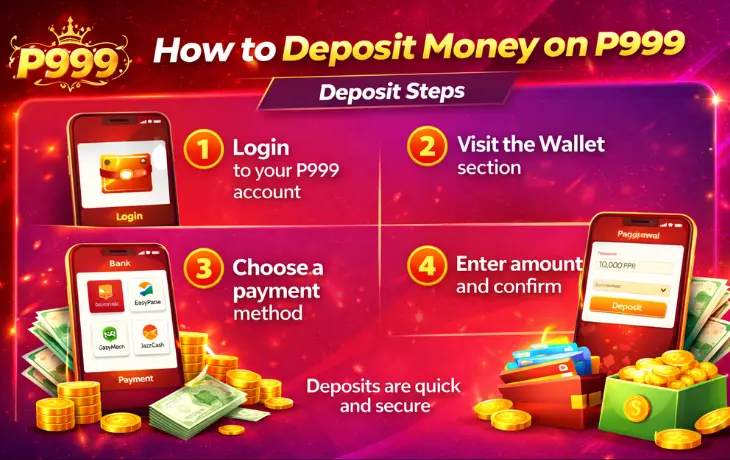
Adding funds to your account takes just a few steps.
- Log in to your account.
- Open the Wallet or Deposit section.
- Choose a payment method: EasyPaisa, JazzCash, or bank transfer.
- Enter the amount you want to add.
- Confirm the payment and wait for your balance to update.
Mobile wallet deposits usually reflect almost instantly. Bank transfers can take a bit longer, depending on your bank.
Tip: Double-check the amount before confirming. Deposits are hard to reverse once submitted.
Deposit Methods Comparison
If you’re deciding which payment method to add funds with, here’s how they stack up against each other.
| Method | Speed | Convenience | Notes |
|---|---|---|---|
| EasyPaisa | Fast, usually instant | High — most users already have it | Good default choice for most players |
| JazzCash | Fast, usually instant | High — widely used across Pakistan | Works the same way as EasyPaisa |
| Bank transfer | Slower, minutes to hours | Lower — requires a bank account | Better for larger amounts |
There’s no wrong choice here. Most players just use whichever wallet they already have set up.
How to Withdraw Money from P999
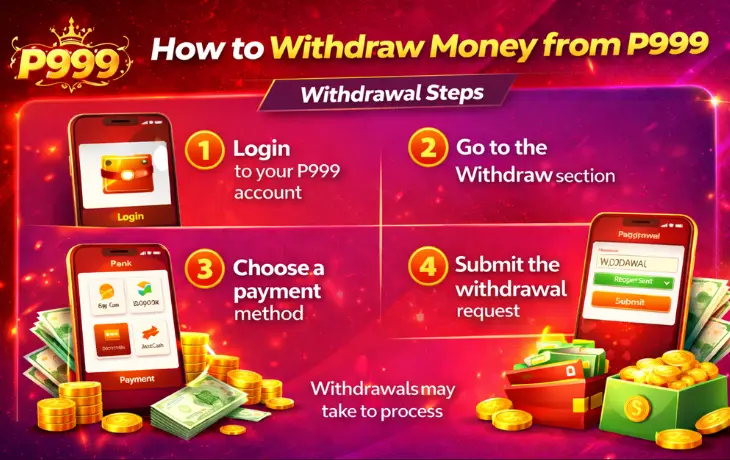
Getting your winnings out works in a similar way, just in reverse.
- Log in to your account.
- Open the Wallet or Withdraw section.
- Choose your payout method.
- Enter the amount you want to withdraw.
- Confirm your account details.
- Submit the request and wait for processing.
Unlike deposits, withdrawals almost never happen instantly. Give it time before assuming something’s wrong.
Withdrawal Methods Comparison
Choosing a withdrawal method matters a bit more than choosing a deposit method, since speed varies more here.
| Method | Typical Speed | Best For |
|---|---|---|
| EasyPaisa | A few hours to a day | Smaller, everyday withdrawals |
| JazzCash | A few hours to a day | Smaller, everyday withdrawals |
| Bank transfer | One to a few business days | Larger amounts, or if you don’t use mobile wallets |
Where possible, withdraw through the same method you deposited with. It keeps your account details consistent and avoids extra verification steps.
Deposit Limits
Deposit limits exist to keep transactions manageable and to reduce fraud risk. They can change, so always check the current numbers inside the app before depositing.
| Limit Type | Typical Range |
|---|---|
| Minimum deposit | Usually a small amount, often under 500 PKR |
| Maximum deposit (single transaction) | Varies by payment method |
| Daily deposit cap | May apply depending on your account status |
If your deposit amount falls outside these ranges, the app will usually tell you before you confirm the payment.
Withdrawal Limits
Withdrawal limits work the same way, but they tend to matter more, since this is where players run into unexpected restrictions.
| Limit Type | Typical Range |
|---|---|
| Minimum withdrawal | Often around 500 PKR |
| Maximum withdrawal (single transaction) | Varies by payment method and account history |
| Daily or weekly cap | May apply, especially for larger accounts |
Note: If you try to withdraw an amount below the minimum, the request usually won’t go through at all. Check the current limit inside your wallet first.
Processing Time
How long a transaction takes depends heavily on the method you choose.
| Method | Deposit Time | Withdrawal Time |
|---|---|---|
| EasyPaisa | Usually instant | A few hours to a day |
| JazzCash | Usually instant | A few hours to a day |
| Bank transfer | Minutes to a few hours | One to a few business days |
Busy periods, weekends, and public holidays can slow things down further. If your withdrawal is taking longer than the ranges above, that alone isn’t a reason to panic.
What Affects Withdrawal Speed
A few factors decide whether your withdrawal lands in an hour or takes a couple of days.
- Verification status. New accounts sometimes go through extra checks the first time they withdraw.
- Request volume. High-traffic periods, like weekends or after big wins, can slow processing for everyone.
- Payment method. Mobile wallets move faster than bank transfers almost every time.
- Accuracy of your details. A mismatched name or account number can pause a withdrawal until it’s corrected.
None of these mean your money is at risk. They just affect timing.
Bank Transfer Payments
Bank transfer is the third option alongside EasyPaisa and JazzCash, and it suits players who prefer working through a traditional bank account.
Deposits by bank transfer usually take longer to reflect than mobile wallet deposits, sometimes up to a few hours. Withdrawals take even longer, often one to a few business days, since they depend on your bank’s own processing schedule.
This method works best for larger transactions, where the slower speed matters less than having a paper trail through your bank.
EasyPaisa Payments
EasyPaisa is one of the most common ways Pakistani players fund their P999 account. It’s fast, widely used, and doesn’t require a full bank account.
To use it, select EasyPaisa in the deposit or withdrawal section, then follow the on-screen steps. Double-check your account number before confirming, since a wrong digit can cause delays that are hard to fix quickly.
For fees, current limits, and anything specific to this method, see our full EasyPaisa payment guide.
JazzCash Payments
JazzCash works much the same way as EasyPaisa, and it’s the other mobile wallet most P999 players rely on.
Deposits and withdrawals through JazzCash usually move quickly, though timing can shift depending on network traffic. Keep your PIN private, and never share it with anyone claiming to help with a transaction.
See our full JazzCash payment guide for method-specific details.
Common Deposit Problems
Deposit problems are usually less stressful than withdrawal problems, mostly because the money hasn’t left your control for long. Still, it helps to know what’s normal and what isn’t.
Most deposit issues have simple explanations. Here are the ones players run into most.
| Problem | Likely Cause | Fix |
|---|---|---|
| P999 deposit failed | Network issue or wrong payment details | Check your connection and retry |
| Balance not updating | Delay in confirmation from the payment provider | Wait a few minutes before contacting support |
| Deposit below minimum | Amount too small for that method | Check the deposit limit table above |
| Wrong account linked | Incorrect wallet number entered | Cancel and re-enter the correct details |
If your money left your EasyPaisa or JazzCash account but never reached your P999 balance, don’t try to deposit again right away. Contact customer support with your transaction details first.
Common Withdrawal Problems
Withdrawals cause more frustration than deposits, mostly because they take longer and involve more steps. Knowing what’s normal ahead of time takes a lot of the stress out of waiting.
| Problem | Likely Cause | Fix |
|---|---|---|
| P999 withdrawal pending | Normal processing time, or high request volume | Wait within the expected window before contacting support |
| Withdrawal below minimum | Amount too small | Check the withdrawal limit table above |
| Account details mismatch | Name or number doesn’t match registration | Correct your details and resubmit |
| Withdrawal rejected | Verification issue or policy violation | Contact support for a specific reason |
A pending withdrawal isn’t automatically a problem. Give it the expected processing time from the table above before assuming something’s gone wrong.
Choosing the Right Method for You
With three payment options available, it helps to think about what actually matters to you before picking one.
If speed is your top priority, EasyPaisa or JazzCash will almost always win. Both process deposits instantly and withdrawals within a day in most cases.
If you’re moving a larger amount, or you simply prefer working through a bank, transfer is the safer, if slower, choice. It leaves a clear paper trail, which some players find reassuring for bigger transactions.
There’s no single “best” answer here. Pick the method that matches your priorities for that transaction, and don’t feel locked into using the same one every time.
Payment Safety Tips
Since real money moves through your account, a few habits are worth building early.
Safety tips:
- Double-check payment details before confirming any deposit or withdrawal.
- Use the same verified account for deposits and withdrawals when possible.
- Keep records of your transactions in case you need to reference them later.
- Only use payment methods listed inside the official app.
- Contact customer support directly if a transaction looks wrong.
Things to avoid:
- Never share your EasyPaisa or JazzCash PIN with anyone.
- Don’t complete a payment through a link sent by text or social media.
- Avoid depositing through unofficial “helper” accounts or agents.
- Don’t ignore a transaction that looks off, even if the amount is small.
Warning: No legitimate P999 support agent will ever ask for your PIN, password, or OTP to “process” a deposit or withdrawal. If someone does, stop and report it. Our Trust and Safety page covers more scam warning signs.
Tracking Your Payment History
Every deposit and withdrawal should show up in your account’s transaction history. Checking it regularly is one of the simplest habits that pays off later.
If a dispute ever comes up, having your own record, even a screenshot, makes it much easier to resolve. Note the date, amount, method, and any reference number the app gives you.
This matters even more for withdrawals, since they take longer and involve more steps than deposits. A clear record means you’re not relying on memory alone if something needs to be checked.
Before You Deposit or Withdraw
A short checklist before your first transaction can save you a headache later.
- Confirm you’re using the official app or website, not a copycat page.
- Make sure your registered phone number and payment account match.
- Start with a small amount the first time, just to see how the process feels.
- Know the current limits and processing times before you submit anything.
- Save your customer support contact details somewhere easy to find.
None of this takes more than a few minutes, and it makes the whole payment experience far less stressful.
Frequently Asked Questions
What is the minimum P999 deposit amount?
It’s usually a small amount, often under 500 PKR, though this can vary by payment method. Check the current limit inside your wallet.
Why is my P999 withdrawal pending?
Most pending withdrawals are just normal processing time. Mobile wallets usually clear within a day; bank transfers can take longer.
Can I use EasyPaisa for deposit and JazzCash for withdrawal?
Some players do this, but using the same method for both is usually simpler and avoids mismatched account details.
Why did my P999 deposit fail?
The most common causes are a network issue or incorrect payment details. Try again after checking your connection, and contact support if it keeps happening.
Is there a fee for deposits or withdrawals?
Fees can vary by payment method. Check our EasyPaisa and JazzCash guides for current details.
How long does a P999 withdrawal actually take?
Mobile wallets usually take a few hours to a day. Bank transfers can take one to a few business days, especially over weekends.
What should I do if my balance doesn’t update after a deposit?
Wait a few minutes first, since some confirmations take a moment. If it still hasn’t updated, contact customer support with your transaction reference.
Do bonuses affect withdrawal limits?
Bonus funds sometimes come with their own conditions before you can withdraw them. Check our bonus page for current terms.
Can I cancel a deposit or withdrawal after submitting it?
Deposits are usually final once confirmed. Withdrawals may sometimes be cancelled before processing starts, but once it’s underway, it’s best to just wait it out.
Is bank transfer safe to use for large amounts?
Yes, and it’s often preferred for larger transactions since it moves through a formal banking channel, even though it’s slower than mobile wallets.
What information should I keep for every transaction?
Save the date, amount, method, and any reference number provided. This makes resolving disputes much faster if one ever comes up.
Final Thoughts
P999 deposit and withdraw both follow a simple flow: pick a method, enter an amount, confirm, and wait for it to process. Deposits are usually fast. Withdrawals take a little more patience, especially with bank transfers.
Most problems come down to small, fixable things: a wrong detail, a slow network, or normal processing time. Work through the tables above before assuming something’s broken.
If you haven’t set up your account yet, start with registration and download the app first. If you’re ready to play, head back to the homepage for a full overview, or reach out to customer support if you need direct help with a transaction.